

💡 Overview
The Advanced Electronic Signature (FES) is a straightforward way to sign directly in sproof Sign without additional release. This signature standard already corresponds to a high security level under EU law, however signers do not require a separate identification and can get started immediately.
For the Qualified Electronic Signature (QES), the highest available security standard under EU law (eIDAS Regulation), the following options are available to signers:
-
Users with an sproof account can use the integrated sproof QES (only with the User+ upgrade):
If you have not yet identified yourself, you will find a detailed explanation of the process in the “QES Identification” module. -
You want to sign with your national eID (e.g., ID Austria, German ID card):
Use the eID Hub for this. The “sproof eID Hub” module explains how the qualified signature in sproof Sign works via the eID Hub.
📖 Important Terms and Background
1. Technical application of digital signatures
In sproof Sign, exactly one digital signature per document is applied for each person per signing process. This happens regardless of how many visual placeholders or form fields for the signature were prepared in the document. The digital signature serves as a technical seal that guarantees the immutability of the entire document as well as the completed form fields after signing.
Even if you as a person place your signature or initials in multiple places in the document, sproof Sign links these visual elements to only a single digital certificate. This ensures that the document is correctly recognized as valid in verification programs. Multiple technical signatures of the same person would complicate validation and increase the file's complexity.
With this logic, the association to the signing person remains unambiguous in the document metadata and compliant with the eIDAS definition. Once the signature has been applied, all data on the document are fixed and can no longer be changed. This offers you maximum security for all Advanced and Qualified signature processes.
2. Legal classification
sproof Sign specializes in legally valid electronic signing. 100% eIDAS-, ZertEs-, FDA-, DORA- & FMA-compliant – recognized throughout Europe.
The eIDAS Regulation governs electronic identities, trust services, and signatures in the EU. It creates a uniform legal framework for secure electronic transactions and ensures EU-wide recognition of electronic signatures.
3. E-signature standards under eIDAS
Simple Electronic Signature (EES)
-
Security: low
-
Verifiability: low, since no identity verification of the signing person is performed (usually only an image of the signature is placed on the document)
-
Use: suitable for, e.g., non-binding agreements or simple confirmations
Advanced Electronic Signature (FES)
-
Security: high
-
Verifiability: high, because the FES is clearly attributable to the signer and their identity is verifiable
-
Use: suitable for, e.g., rental agreements, simple purchase contracts
Qualified Electronic Signature (QES)
-
Security: maximum
-
Verifiability: maximum, because a person must identify themselves for a QES with an EU-certified Trust Service Provider (TSP)
-
Special features: can, as the only type of electronic signature, replace the handwritten form (“requirement of written form”)
-
Use: suitable for contracts and legal transactions with high legal effect or statutory written form requirements, e.g., guarantees, termination letters,…
4. Identification for the qualified electronic signature
The integrated sproof QES
sproof Sign offers its own direct identification process for an integrated Qualified Electronic Signature (QES). Swisscom acts as the technical provider (TSP) in this context.
This process is included free of charge for plan members with a User+ license.
→ Info on identification in sproof Sign can be found in the “QES Identification” module.
QES via eID Hub (External Providers)
Background: External QES Providers
The sproof Sign eID Hub allows you to use existing national electronic identities (eIDs) to sign in a qualified manner.
To use such an external QES, you must register with a nationally certified provider (also called a Trust Service Provider or TSP). Examples include A-Trust in Austria (for ID-Austria) or D-Trust in Germany. This external process ensures that your signature is clearly attributable to you and has the same legal validity as your handwritten signature.
Instructions: Obtain and use an external eID
The process to obtain an external eID takes place entirely outside of sproof Sign and is managed by the respective national authorities or providers. Detailed instructions can be found on the official websites of the respective providers (e.g., for ID-Austria at the following link: https://www.id-austria.gv.at/de/registrieren ).
Once your account with the external provider (e.g., ID-Austria, D-Trust) is fully activated, you can return to sproof Sign. If you need to sign a document in a qualified manner, simply select your provider from the list in the eID Hub and follow the release instructions.
Note: Plan admins can set the rights and roles of team members in the role settings, including the e-signature standard.
→ The detailed explanation can be found in the “Rights and Role Management” module.
5. Signature standards in sproof Sign
sproof Sign offers the eIDAS-compliant signature types – EES, FES and QES. In addition, sproof Sign offers two further forms to cover a very wide range of use cases: FES+ and QES including identification
sproof EES
The EES from sproof Sign offers the fastest way to collect signatures, e.g., directly on site, without signers having to authenticate themselves.
An appropriate quota must be stored in the plan for EES signatures.
→ Read more in the “On-Site Signature” module.
sproof FES
The FES from sproof Sign is based on a company seal (sproof GmbH) and email verification. Each signer receives their own FES with a seal upon signing – traceable and documented.
Changes after a signature (e.g., a form field filled in) are clearly detectable during validation. The association to the signing person is made via document metadata – compliant with the eIDAS definition of FES.
By comparison: Docusign uses a central seal independent of the number of signatures. As a result, subsequent changes are not clearly detectable; furthermore, such signatures are sometimes considered invalid in the EU validator.
Note: The sproof certificate can be replaced by your own or integrated as an additional option.
sproof FES+
sproof FES+ is a security-optimized variant of the Advanced Electronic Signature. It combines the simple signing process with two-factor authentication (2FA) to conclusively substantiate the signer's identity. In addition to the email link, the signer must enter a security code that is delivered in real time via SMS or email.
This additional step significantly increases the evidential value of contracts without requiring video identification (as with QES).
An appropriate quota must be stored in the plan for FES+ signatures.
sproof QES
The sproof QES is a qualified electronic signature according to eIDAS that is issued directly via sproof Sign and is standardly included in the User+ license. In addition, batch signatures can be processed with the sproof QES: qualified signing of multiple documents with only one release of the second factor via mobile phone.
One-time QES including identification
With the QES including identification, external persons who do not possess a QES can be invited to an identification process in order to sign the requested document once in a qualified manner.
6. When is which signature standard required?
In principle, the qualified electronic signature is always required when:
-
the respective national law of EU member states requires the written form:
The qualified electronic signature offers the possibility to fully replace the handwritten signature.
-
Operational or business risks exist:
Besides legal requirements, the decision for a particular digital signature standard depends on an individual assessment of possible risks, which in turn is made based on liability considerations, contract scope, as well as evidentiary value and legal certainty.
For most contracts, there is freedom of form, which means they can be concluded orally or in writing, including electronically. Electronic documents can generally be signed with any form of e-signature (EES, FES or QES). However, if written form is legally required or contractually agreed, a qualified electronic signature (QES) is necessary. This means that the contracting parties must at least record the main points of the contract in writing or electronically and sign them with a qualified electronic signature, since only this can replace the handwritten signature. In summary, the QES must be used when there is a formal requirement, unless the national law of the member states prohibits the creation of electronic documents; the QES may be used when there is freedom of form, also known as “chosen form”.
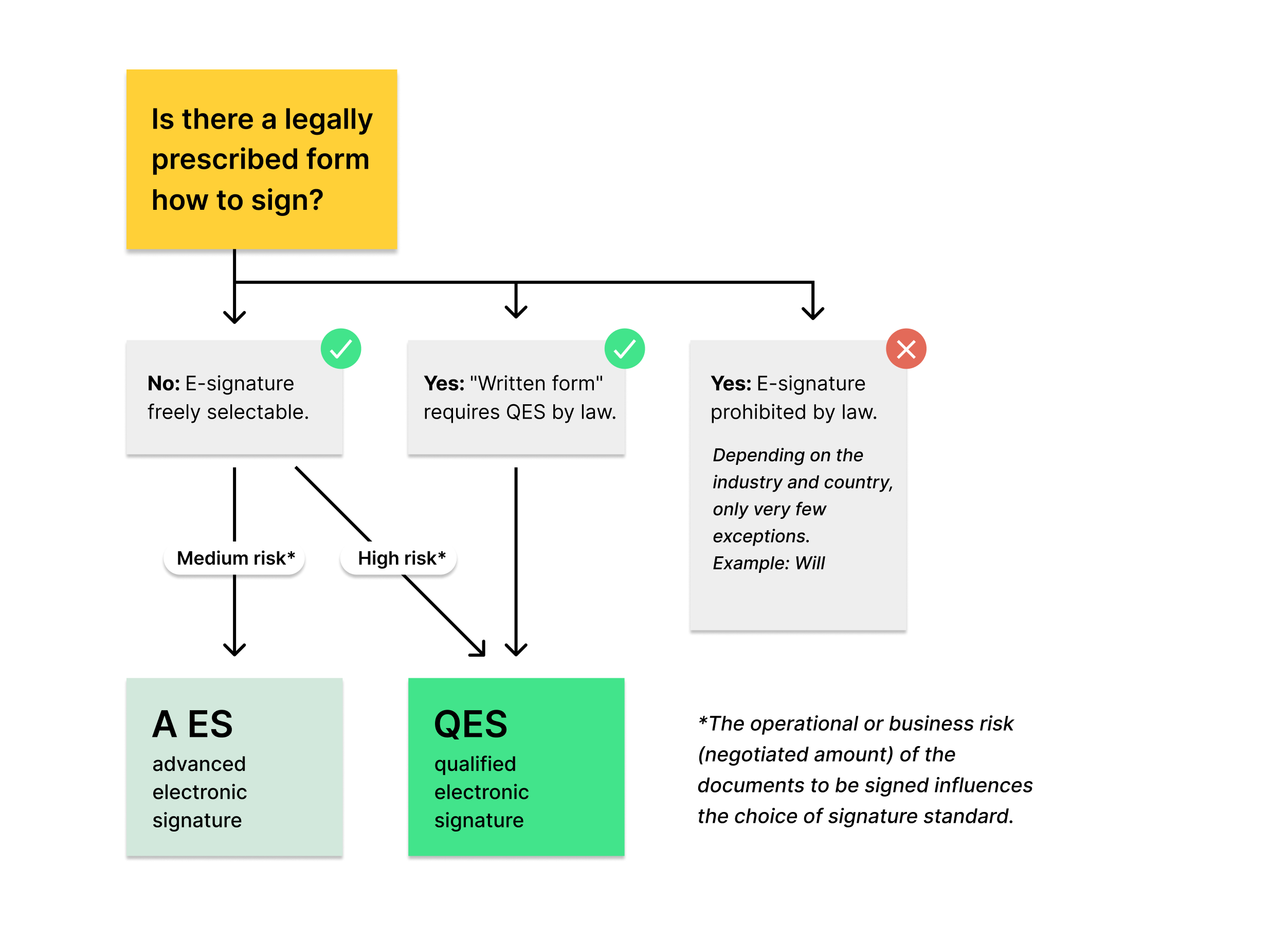
1A. Moderate risk + freedom of form:
In principle, you decide which e-signature standard you want to use when a contract can be concluded “without form”. We always recommend signing at least with the Advanced Electronic Signature (FES) to achieve a good balance of security and evidentiary value (even oral contracts can be “binding” under freedom of form). The contract is thus legally validly signed.
1B: High risk + freedom of form:
Attention: You can practically sign the contract arbitrarily, but for contracts with high liability risk we recommend the qualified electronic signature!
Examples of contracts with high liability risk include, among others: construction contracts and financial and insurance contracts.
2: Written form:
For certain contracts, the QES is legally required and there is no leeway in choosing which e-signature standard to use. Only the QES is equated with the handwritten signature by EU-wide law.
3: E-signature excluded:
A rarity: There are only very few contracts for which you must still sign by hand by law. Even here the QES cannot be used. Examples include: prenuptial agreements, wills, and land purchase contracts.
Our view: It is only a matter of time until laws are adapted so that, in the interest of the environment and the economy, all documents can without exception be signed electronically.
7. Electronic certificates & seals
In sproof Sign, companies and individuals can store signature certificates to issue advanced signatures with an official digital proof. While for individuals this is referred to as a digital signature, the same technology in the corporate context is called a company seal (engl. SEAL). Both are based on a digital certificate that is uniquely assigned to a person or organization.
-> Detailed information can be found in the “Company Seals & Certificates” module.
We are happy to assist you with integrating your company seal or personal certificate.
📧 Contact: support@sproof.com
📑 Step-by-Step Guide
1. Sending documents
People who can upload and send documents have the option to:
-
set a signature type bindingly for all recipients (“document signature type”).
-
set a signature type bindingly for individual recipients (“individual signature type”).
Important: The individual signature type overrides the document signature type. That is, if FES is set for the document but QES is defined for one person, that person must sign with QES, all others with FES.
→ Detailed information on collecting signatures can be found in the module series under the tab “Collecting Signatures & Approvals”.
2. Signing documents
People who can sign documents have the option to:
-
choose the desired signature type or provider themselves OR
-
sign with the signature type specified by the sender.
-
undergo an identification procedure for the sproof QES.
→ Detailed information on signing documents can be found in the module “Sign yourself, Approve, View“.
→ If you want to learn more about identification procedures for a QES, we refer you to the “QES Identification” module.
3. Global plan settings for signatures & seals
Plan administration has the ability to:
-
set in the rights and role settings whether your team members are only allowed to sign with a specific signature standard (e.g., FES+ or QES).
-> Detailed explanations can be found in the modules “QES Settings for Plan Admins” and “Rights and Role Management”. -
define the second factor for FES+ (SMS or email) in the rights and role settings.
-
upload certificates.
→ Detailed information can be found in the “Company Seals & Certificates” module.
4. Using the API
Via the sproof API it is possible to:
-
specify a signature type in the API request both for the entire document and for individual recipients
-
select the signature provider for individual recipients