

Important Information for Plan Owners in sproof Sign
This guide provides you with a structured overview of the central administrative tasks and the management of your sproof Sign plan.
What is sproof Sign?
sproof is Europe's modular all-in-one platform for e-signatures and identity verifications. Companies with the highest demands on security, efficiency, and scalability digitize their signature and identification processes with a single solution – legally valid, eIDAS-compliant, and 100% GDPR-compliant.
From identity verification to signature workflows to integration and validation modules: sproof combines everything enterprise companies need to implement digital processes securely, seamlessly, and at scale – web-based, multilingual, and operated on European servers.
The administrative structure of your plan
The management of your company plan is based on clearly defined roles to ensure security and easy organization:
-
Plan owner: Each organization has exactly one plan owner. This person bears overall responsibility for the contract, licenses, and billing. The plan owner cannot be removed.
-
Administrators: Support the plan owner with operational tasks such as managing users and assigning licenses.
Role & permission management: All other access rights and permissions for members are flexibly and in detail controlled via assigned roles.
Transferring Plan Ownership
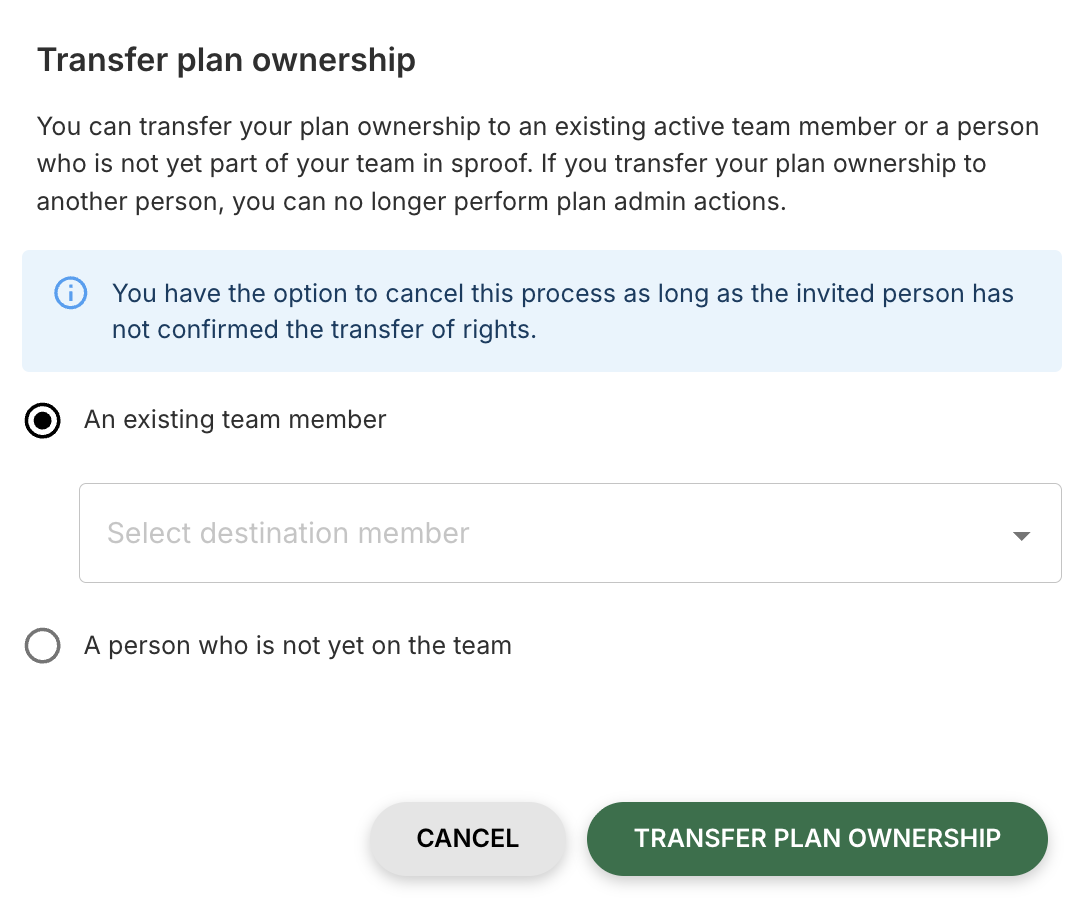
In sproof Sign under Licenses & Team, you can transfer plan ownership. To do this, click the “Transfer Plan Owner Rights” button.
You can transfer plan owner rights to
-
an existing active team member or
-
a person who is not yet on the team.
When you transfer the plan owner rights to another person, you will no longer be able to perform plan administration actions.If you transfer the plan owner rights to another person, you will no longer be able to perform plan administration actions.
Licenses, quotas, and billing
-
Contract basics
The fundamental framework conditions of your plan.
-
Duration: Each plan basically has a duration of one year.
-
Renewal: Your plan automatically renews for another year according to the most recently agreed contents and quotas.
-
Special regulation for framework agreements: Unless otherwise agreed, the plan starts with a short year (from conclusion until the end of the year) and thereafter renews annually.
-
Licenses & quotas in the admin dashboard
The admin dashboard is your central point for monitoring and managing your licenses.
2.1. Usage overview in the "License and Team" tab
Here you can see at a glance:
-
Available and used User and User+ (Upgrade) licenses.
-
Available and consumed signature quotas (Advanced and Qualified).
-
A progress bar showing the current consumption of your signature quota.
2.2. Management of user licenses
-
Additional purchase: Additional User or User+ licenses can be added under License & Team when adding plan members. The monthly additional costs will be transparently displayed to you before purchase.
-
Billing: Billing for additional licenses is done pro rata until the end of the current plan period. The invoice is issued at the beginning of the following month.
2.3. Management of signature quotas
-
Important note on validity: Signature quotas are not transferable to the next plan period and must be used within the current term.
-
Automatic notification: Once your quota falls below 10%, the registered admin contact will be informed by email. (Please check your notification settings).
-
Additional purchase: Additional signature quotas can be purchased through customer support. Billing starts from the following month.
-
Major adjustments: For extensive changes (e.g., doubling the quota), please contact your Customer Success Manager or sales@sproof.com.
-
Additional signature types and services
If you require signature types or services not included in your current plan, please contact your account manager.
Purchasable options:
-
Simple Electronic Signature (SES)
-
Advanced Electronic Signature Plus (AES+)
-
Qualified Electronic Signature (QES)
-
One-Time-QES incl. identification
-
Seals
-
Billing and administration
-
Invoicing: The initial billing takes place at plan start. The invoice is sent by email and includes a Stripe link for payment and to store your credit card.
-
Transfer of plan ownership: It is possible to transfer ownership of the plan including important assets (workflows, templates, etc.) to another person. The transfer is done in Settings > License & Team in the "Plan Members" tab via the "Transfer Plan Owner Rights" button.
Support & Help
We know that technical challenges can be frustrating, and our goal is to assist you quickly and efficiently. With our comprehensive expertise, we support you specifically with every inquiry.
Direct Contact: Choose the Right Channel
If you do not find a solution there, our team is available to assist you. To process your request as quickly as possible, please choose the appropriate channel:
-
For Plan Extensions & Upgrades Are you a plan admin wanting to expand functionality? Our sales team will be happy to advise you.
📧 Email: sales@sproof.com -
For Technical Errors & Bug Reports Have you discovered a technical error? Please report it directly to our technical team so we can address it promptly.
📧 Email: ticket@sproof.com -
For General & Technical Inquiries For all other questions about the application or technical challenges, our support team is available to assist you.
📧 Email: support@sproof.com
Take a look at our Status Page. Here you can always see the status of our services and can also subscribe to the news feed to stay up to date.
Depending on your contract, you can choose between basic and premium support. The goal is to ensure that you receive quick and reliable assistance when needed – tailored to your individual requirements.
-
Basic Support (Standard included in all packages)
-
Basic support is included by default in every sproof Sign plan.
-
Contact is made via the email ticket system: ticket@sproof.com
-
Response time: max. 72 hours on business days.
-
Covers basic application questions, technical issues, and simple error analyses.
-
Remote Support includes: This feature allows the sproof support team – after
explicit consent by the plan member – a temporary access to the respective account. -
Unless otherwise agreed, basic support automatically applies as part of the contract.
-
Premium Support (optional additional service)
For contract partners with extended support needs, premium support is available. This offers:
-
Telephone support
-
Prioritized handling of all incoming requests
-
Faster response times than basic support
-
Dedicated support staff who know your setup and requirements
Premium support can also be added to the contract later – for example, with growing demand or increasing complexity.
-
Support Upgrades and Prices
If you are interested in premium support or extended services, please contact our sales team directly: sales@sproof.com
We are happy to advise you individually on prices, availability, and integration into your existing plan.
Do you have questions?
📧 Contact: support@sproof.com
🤝 We look forward to your inquiry.
Accessibility Statement
Read our spoof sign_Accessibility_Statement.pdf to learn how we make sproof Sign accessible.